.mp-article { max-width: 780px; margin: 0 auto; font-family: ‘Inter’, sans-serif; color: #1a1a2e; line-height: 1.7; font-size: 17px; } .mp-article h2 { font-size: 1.75rem; font-weight: 700; color: #06090f; margin: 48px 0 14px; line-height: 1.2; } .mp-article h3 { font-size: 1rem; font-weight: 700; color: #16a34a; margin: 32px 0 10px; } .mp-article p { margin-bottom: 16px; color: #374151; } .mp-article p strong { color: #06090f; } .mp-article a { color: #16a34a; } .mp-article hr.mp-div { border: none; border-top: 1px solid #e5e7eb; margin: 44px 0; } .mp-problem { background: #fef2f2; border-left: 3px solid #ef4444; border-radius: 10px; padding: 20px 24px; margin: 24px 0; } .mp-problem .lbl { font-size: 11px; font-weight: 700; letter-spacing: .1em; color: #ef4444; display: block; margin-bottom: 8px; } .mp-problem p { margin: 0; color: #374151; } .mp-steps { margin: 24px 0; } .mp-step { display: flex; gap: 16px; margin-bottom: 20px; align-items: flex-start; } .mp-step-num { width: 32px; height: 32px; border-radius: 50%; background: #f0fdf4; border: 1px solid #bbf7d0; display: flex; align-items: center; justify-content: center; font-size: 13px; font-weight: 700; color: #16a34a; flex-shrink: 0; margin-top: 2px; } .mp-step h4 { font-size: .95rem; font-weight: 600; color: #111827; margin: 0 0 4px; } .mp-step p { font-size: .88rem; color: #6b7280; margin: 0; line-height: 1.5; } .mp-feat-grid { display: grid; grid-template-columns: 1fr 1fr; gap: 14px; margin: 24px 0; } @media(max-width:600px){ .mp-feat-grid { grid-template-columns: 1fr; } } .mp-feat { background: #f9fafb; border: 1px solid #e5e7eb; border-radius: 10px; padding: 18px 20px; } .mp-feat .ico { font-size: 1.5rem; display: block; margin-bottom: 8px; } .mp-feat h4 { font-size: .92rem; font-weight: 600; color: #111827; margin: 0 0 5px; } .mp-feat p { font-size: .85rem; margin: 0; color: #6b7280; line-height: 1.5; } .mp-screens { display: flex; gap: 20px; justify-content: center; align-items: flex-end; flex-wrap: wrap; margin: 32px 0; } .mp-screen-wrap { display: flex; flex-direction: column; align-items: center; } .mp-screen-lbl { font-size: 11px; color: #9ca3af; margin-top: 10px; font-weight: 500; } .mp-phone { width: 200px; background: #000; border-radius: 28px; border: 5px solid #222; box-shadow: 0 20px 40px rgba(0,0,0,.18); overflow: hidden; } .mp-phone::before { content: ”; display: block; width: 54px; height: 9px; background: #111; border-radius: 0 0 7px 7px; margin: 0 auto; } .mp-phone-screen { background: #111827; padding: 14px 13px 18px; min-height: 320px; } .mp-watch { width: 140px; background: #000; border-radius: 32px; border: 5px solid #222; box-shadow: 0 20px 40px rgba(0,0,0,.18); overflow: hidden; } .mp-watch-screen { background: #1a1f2e; padding: 11px 9px 13px; min-height: 140px; } .mp-watch-screen.tournament { background: #d4d4d4; } .sc-hdr { font-size: 8px; color: #4b5563; text-align: center; margin-bottom: 7px; letter-spacing: .06em; } .sc-badge { display: block; width: fit-content; margin: 0 auto 10px; background: rgba(22,163,74,.1); border: 1px solid rgba(22,163,74,.25); border-radius: 100px; font-size: 8px; color: #16a34a; padding: 2px 8px; } .sc-row { display: flex; justify-content: space-between; align-items: center; padding: 6px 7px; border-radius: 7px; margin-bottom: 4px; } .sc-row.w { background: rgba(22,163,74,.08); border: 1px solid rgba(22,163,74,.2); } .sc-row.l { background: rgba(0,0,0,.04); border: 1px solid rgba(0,0,0,.06); } .sc-name { font-size: 9px; font-weight: 600; color: #f9fafb; } .sc-score { font-size: 17px; font-weight: 700; color: #f9fafb; } .sc-sets { font-size: 7px; color: #9ca3af; } .sc-code { text-align: center; margin-top: 12px; font-size: 8px; color: #6b7280; } .sc-code span { font-family: monospace; font-size: 13px; color: #16a34a; font-weight: 700; letter-spacing: .15em; } .sc-sync { display: flex; align-items: center; gap: 4px; justify-content: center; margin-top: 7px; font-size: 8px; color: #22c55e; } .sc-dot { width: 4px; height: 4px; border-radius: 50%; background: #22c55e; } .ws-sport { font-size: 8px; color: #a3e635; text-align: center; margin-bottom: 6px; letter-spacing: .07em; } .ws-row { display: flex; justify-content: space-between; align-items: center; padding: 5px 6px; border-radius: 6px; margin-bottom: 3px; } .ws-row.w { background: rgba(163,230,53,.1); } .ws-row.l { background: rgba(255,255,255,.04); } .ws-name { font-size: 8px; font-weight: 600; color: #f1f5f9; } .ws-score { font-size: 15px; font-weight: 700; color: #f1f5f9; } .ws-code { text-align: center; margin-top: 9px; font-size: 7px; color: #4b5563; } .ws-code span { font-family: monospace; font-size: 10px; color: #a3e635; font-weight: 700; letter-spacing: .12em; } .tor-badge { font-size: 7px; background: #bbb; color: #333; border-radius: 4px; padding: 1px 5px; margin: 0 auto 5px; display: block; width: fit-content; font-weight: 700; } .wt-sport { font-size: 8px; color: #333; text-align: center; margin-bottom: 6px; } .wt-row { display: flex; justify-content: space-between; align-items: center; padding: 5px 6px; border-radius: 6px; margin-bottom: 3px; } .wt-row.w { background: rgba(0,0,0,.08); } .wt-row.l { background: rgba(0,0,0,.04); } .wt-name { font-size: 8px; font-weight: 600; color: #111; } .wt-score { font-size: 15px; font-weight: 700; color: #111; } .wt-code { text-align: center; margin-top: 9px; font-size: 7px; color: #555; } .wt-code span { font-family: monospace; font-size: 10px; color: #111; font-weight: 700; letter-spacing: .1em; } .mp-dl-grid { display: grid; grid-template-columns: repeat(auto-fit, minmax(180px, 1fr)); gap: 12px; margin: 24px 0; } .mp-dl { display: flex; align-items: center; gap: 12px; background: #f9fafb; border: 1px solid #e5e7eb; border-radius: 10px; padding: 14px 16px; text-decoration: none; } .mp-dl:hover { border-color: #16a34a; background: #f0fdf4; } .mp-dl .ico { font-size: 1.5rem; } .mp-dl .lbl { font-size: 10px; color: #9ca3af; } .mp-dl .nm { font-size: .88rem; font-weight: 600; color: #111827; display: block; } .mp-guide { background: #f9fafb; border: 1px solid #e5e7eb; border-radius: 14px; padding: 24px; margin: 20px 0; } .mp-guide h3 { margin-top: 0; } .mp-gstep { display: flex; gap: 12px; margin-bottom: 14px; } .mp-gnum { width: 22px; height: 22px; border-radius: 50%; background: #e5e7eb; display: flex; align-items: center; justify-content: center; font-size: 11px; font-weight: 700; color: #6b7280; flex-shrink: 0; margin-top: 2px; } .mp-gtext { font-size: .88rem; color: #4b5563; line-height: 1.55; } .mp-gtext strong { color: #111827; } .mp-callout { background: #f0fdf4; border: 1px solid #bbf7d0; border-radius: 10px; padding: 16px 20px; margin: 20px 0; font-size: .88rem; color: #166534; line-height: 1.6; } .mp-callout strong { color: #15803d; } .mp-gsep { border: none; border-top: 1px solid #e5e7eb; margin: 18px 0; } .mp-tip { font-size: .83rem; color: #9ca3af; margin-top: 14px; } .mp-tip strong { color: #4b5563; }
IL PROBLEMA

Durante una partita di padel o tennis a livello amatoriale, tenere il punteggio è sempre un casino. Chi segna? Su quale schermo? E se il telefono è in borsa? Il risultato è che si litiga, si perde il filo, si ricomincia a discutere su quale fosse il punteggio esatto tre punti fa.

Match.Point nasce da un problema concreto e frequente: il punteggio condiviso non esiste nei contesti amatoriali. Le soluzioni esistenti richiedono installazioni, account, abbonamenti, o sono semplicemente troppo complesse per essere usate in campo tra una partita e l’altra.

La risposta è chirurgica: un link, un codice a 4 cifre, e tutti i dispositivi si sincronizzano. Funziona su smartphone Android e iOS, su smartwatch Wear OS e Apple Watch. Nessuna app da scaricare — è una Progressive Web App, si apre dal browser.


Come funziona in pratica

Il flusso è progettato per essere completato in meno di 15 secondi:

1

Apri l’app su smartphone

Nessuna installazione. Apri il link da browser, scegli il sport (padel o tennis), inserisci i nomi dei team. Opzionale: aggiungi emoji e bandiere.

2

Genera il codice

L’app genera automaticamente un codice a 4 cifre. Gli altri lo inseriscono sul loro dispositivo per unirsi alla partita.

3

Sincronizzazione istantanea

Il punteggio si aggiorna su tutti i dispositivi connessi in meno di 200ms. Smartwatch al polso, smartphone in campo, tablet a bordo — tutti allineati.

4

Fine partita, storico automatico

Al termine del match, il risultato entra nello storico locale. Da lì si può condividere come immagine per Instagram Stories (card 1080×1920).
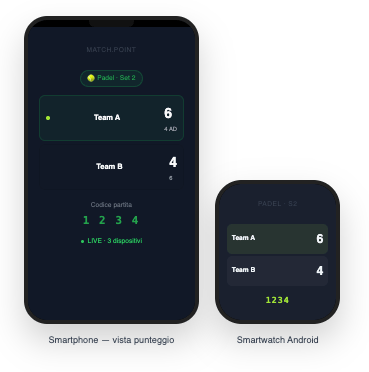
MATCH.POINT

🎾 Padel · Set 2
Team A
6
4 AD
Team B
4
6
Codice partita
1 2 3 4
LIVE · 3 dispositivi

Smartphone — vista punteggio

PADEL · S2

Team A6
Team B4
1234

Smartwatch Android


Cosa include l’app

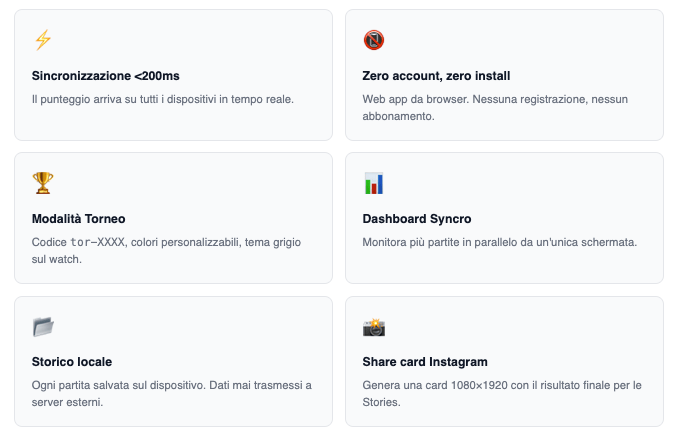
Sincronizzazione <200ms

Il punteggio arriva su tutti i dispositivi in tempo reale.

📵

Zero account, zero install

Web app da browser. Nessuna registrazione, nessun abbonamento.

🏆

Modalità Torneo

Codice tor-XXXX, colori personalizzabili, tema grigio sul watch.

📊

Dashboard Syncro

Monitora più partite in parallelo da un’unica schermata.

📂

Storico locale

Ogni partita salvata sul dispositivo. Dati mai trasmessi a server esterni.

📸

Share card Instagram

Genera una card 1080×1920 con il risultato finale per le Stories.

Modalità Torneo sul smartwatch

In modalità torneo lo smartwatch cambia automaticamente tema — grigio chiaro invece del dark standard — così chi è a bordo campo identifica al volo che è una partita ufficiale.
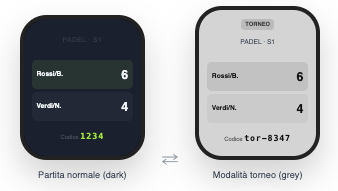
PADEL · S1

Rossi/B.6
Verdi/N.4
Codice 1234

Partita normale (dark)

TORNEO

PADEL · S1

Rossi/B.6
Verdi/N.4
Codice tor-8347

Modalità torneo (grey)


Scarica e accedi all’app

Match.Point non richiede installazione. Si accede da browser e si può salvare sulla home screen del dispositivo.
Come installare Match.Point sul tuo smartwatch

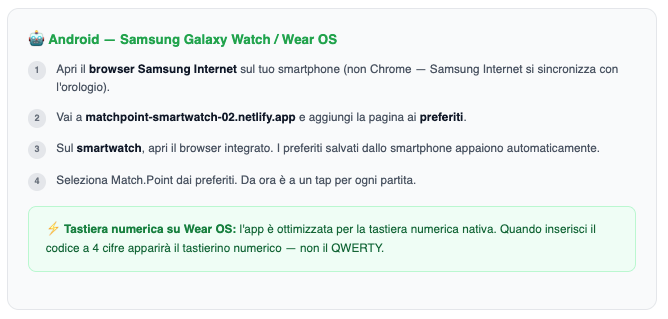
🤖 Android — Samsung Galaxy Watch / Wear OS

1
Apri il browser Samsung Internet sul tuo smartphone (non Chrome — Samsung Internet si sincronizza con l’orologio).
2
Vai a matchpoint-smartwatch-02.netlify.app e aggiungi la pagina ai preferiti.
3
Sul smartwatch, apri il browser integrato. I preferiti salvati dallo smartphone appaiono automaticamente.
4
Seleziona Match.Point dai preferiti. Da ora è a un tap per ogni partita.
⚡ Tastiera numerica su Wear OS: l’app è ottimizzata per la tastiera numerica nativa. Quando inserisci il codice a 4 cifre apparirà il tastierino numerico — non il QWERTY.

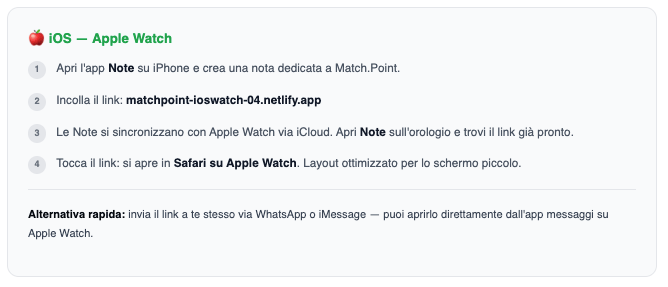
🍎 iOS — Apple Watch

1
Apri l’app Note su iPhone e crea una nota dedicata a Match.Point.
2
Incolla il link: matchpoint-ioswatch-04.netlify.app
3
Le Note si sincronizzano con Apple Watch via iCloud. Apri Note sull’orologio e trovi il link già pronto.
4
Tocca il link: si apre in Safari su Apple Watch. Layout ottimizzato per lo schermo piccolo.

Alternativa rapida: invia il link a te stesso via WhatsApp o iMessage — puoi aprirlo direttamente dall’app messaggi su Apple Watch.


Per chi è pensato

🤝

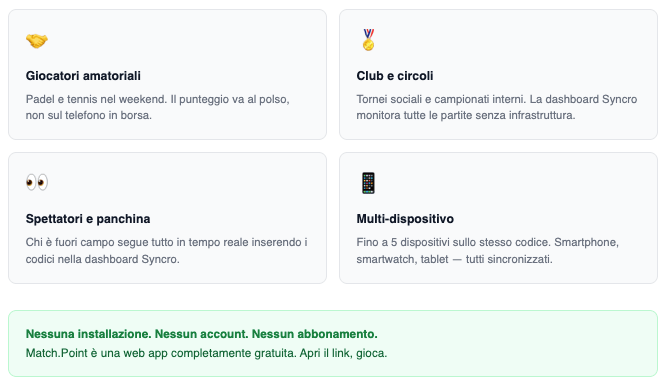
Giocatori amatoriali

Padel e tennis nel weekend. Il punteggio va al polso, non sul telefono in borsa.

🏅

Club e circoli

Tornei sociali e campionati interni. La dashboard Syncro monitora tutte le partite senza infrastruttura.

👀

Spettatori e panchina

Chi è fuori campo segue tutto in tempo reale inserendo i codici nella dashboard Syncro.

📱

Multi-dispositivo

Fino a 5 dispositivi sullo stesso codice. Smartphone, smartwatch, tablet — tutti sincronizzati.

Nessuna installazione. Nessun account. Nessun abbonamento.
Match.Point è una web app completamente gratuita. Apri il link, gioca.

Segui su Instagram @matchpointreal per aggiornamenti e nuove funzionalità.

Lascia un commento